Quick & Easy ArubaCX IGMP Configuration Guide
DISCLAIMER:
This is not meant to be a complete in-depth guide, just sharing the basics that might help in a time crunch.
Internet Group Management Protocol (IGMP) operates at Layer 3 and is responsible for managing multicast group membership on a network. In a well designed setup, the IGMP querier runs on the network gateway this may be a router, firewall, or Layer 3 switch. This device periodically sends queries to determine which hosts want to receive specific multicast streams, allowing it to maintain accurate group membership information.
At Layer 2, IGMP Snooping allows switches to efficiently handle multicast traffic. The switch listens to IGMP messages exchanged between hosts and the querier, building a table that maps multicast groups to the specific ports that requested them. This ensures multicast traffic is forwarded only to the relevant ports instead of being flooded across the entire network.
TLDR: On your Layer 3 interface of your VLAN (SVI on Layer 3 switch) you will enable IGMP. On Layer 2 VLANs you will enable IGMP snooping.
Some important things to keep in mind:
- Aruba CX switches use IGMPv3 by default. Unless your application requires SSM (Source-Specific Multicast), I recommend sticking with IGMPv2 to avoid possible issues and unnecessary complexity.
- If your CX switch is not the gateway you will only need to enable snooping.
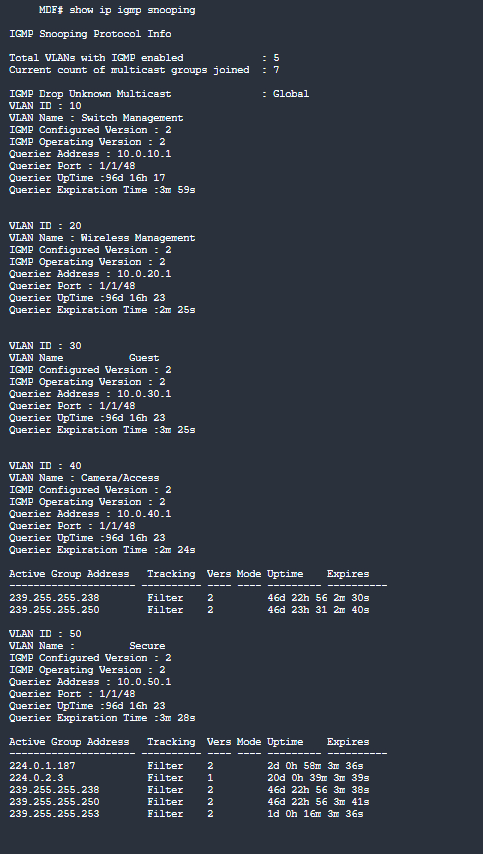
- It is best practice to choose the querier, some devices have IGMP enabled by default, which can cause them to be chosen as the querier. After configuration ensure that the expected IGMP Querier IP is being used.
Let’s get started
- Layer 3 SVI configuration
switch# conf t
switch(config)#
switch(config)# int vlan 200 <—–(Select the layer 3 interface of your VLAN)
switch(config-if-vlan)#ip igmp enable
switch(config-if-vlan)# ip igmp version 2 - Layer 2 VLAN configuration
switch(config-if-vlan)# vlan 200 <—– (Select your VLAN)
switch(config-vlan-200)# ip igmp snooping enable
switch(config-vlan-200)# ip igmp snooping version 2 - Verify with show commands
Note: The examples given below have been modified to remove sensitive information, and the querier is a firewall.
switch(config)# show run int vlan 200
interface vlan200
ip address 10.0.0.1/24
ip igmp enable
ip igmp version 2
exit
switch(config-if)# show ip igmp snooping
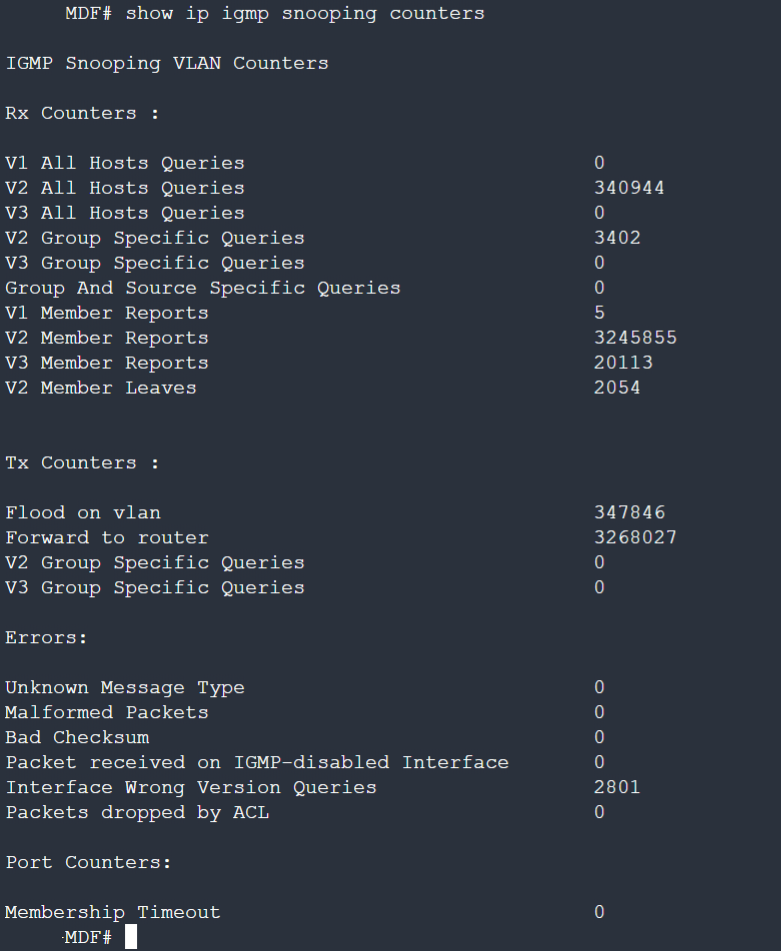
switch(config-if-vlan)# show ip igmp snooping counters
Note: If you don’t select the correct IGMP snooping version you will show wrong version queries as in the example below; This has since been corrected in this environment.
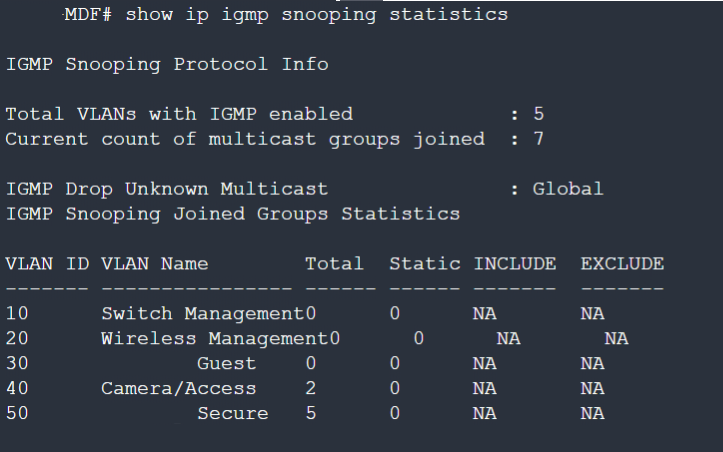
switch(config)# show ip igmp snooping statistics